


The GTM tech space is flooded with platforms that detect “signals” and trigger outbound: job postings, executive hires, funding, intent signals, and so on.
The problem is that these agents have no model of your organization’s unique buying scenarios and limited account context to reason over. As a result, they default to treating the signal itself as the reason to reach out bolting a generic pitch on top.
That disconnect between the “signal” and the “pitch” is what makes these emails read like:
“Hey, I saw you’re hiring engineers. We help engineering teams improve productivity. Worth a conversation?”
Technically, it’s personalized. but it’s not relevant. It reads like AI slop, and buyers ignore it.
The Real Job: Connecting Signals to Buying Situations
I wrote about this in a previous article:
The winning go to market teams in the AI era aren’t the ones with more ‘signals’. They’re the ones who are identifying ‘signals’ unique to their industry and treating these ‘signals’ like evidence of specific buying scenarios, at scale.
In other words, they’re taking a ‘scenario-led’ approach instead of a ‘signal-led’ approach.
This reframes how an agent should treat a signal. A signal should only trigger outbound if it can be categorized as one of three things:
Evidence a company is actively trying to solve a situation (i.e., a job posting mentioning a solution-oriented responsibility).
Evidence a company would care about solving it (i.e., a shift/event that raises the stakes of that problem).
Evidence the situation is simply present (i.e., a tech-stack signal that implies the problem exists).
If a signal isn’t one of those three, it isn’t meaningful for that play, and it shouldn’t be used.
The messaging logic then becomes:
Identified signal → likely buying situation → relevant solution → call to action
That’s what makes an email feel timely, well-researched, and sent with a real reason to introduce your solution over an email.
Let’s break down how to automate this at scale.
Why This is a Hard Automation Problem
There are several technical reasons why this is difficult to automate:
It requires all relevant context to be available to the agent (including internal data, external research, product usage, engagement history, etc.).
It requires a judgement layer that uses your insights to determine the most relevant buying situation.
It needs to know whether and how each signal ties back to your identified buying scenarios.
And ideally, it’s aware of what’s already happened: previous signals, what’s still relevant, what’s been tried, etc.
Without this, most AI outreach collapses to:
Detect signal → Insert signal into opening line → Add generic product pitch → Combine in email
Which is exactly what produces the surface-level messaging buyers flag as spam.
The Core Principle: Deterministic Scaffolding, Generative Judgment
The fix is a system that:
Inserts your own unique insights (“GTM Alpha”).
Constrains what the model is allowed to decide.
The scaffolding is deterministic: the library of plays, the rules mapping signals to situations, the narrative structure of each email, and the retrieval logic that assembles the payload.
The LLM has three “judgement” jobs inside that scaffolding: 1) determines which “play” best fits, 2) decides which supporting account/contact context is most relevant and 3) writes the email draft.
So the pipeline looks like:
Detect signal → Combine with account context → Evaluate against predefined buying situations → Map to a related solution-oriented pitch → Generate a contextually relevant email
The Architecture:
Here’s an overview:
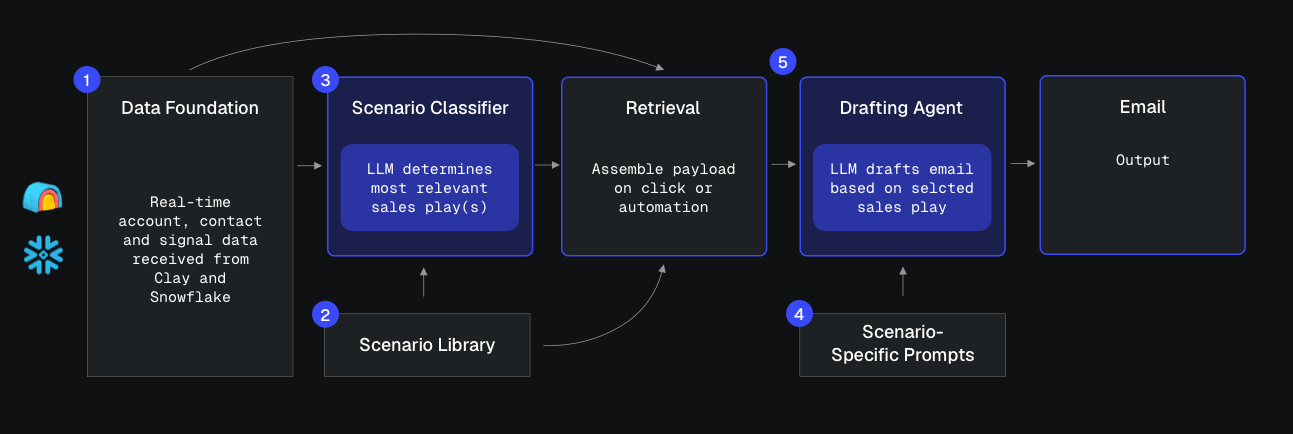
Let’s walk through each component.
Part 1: The Data Foundation
Step one is to get all account, contact and signal data (internal and external) into one place. In my build, a custom application uses Supabase as the backend, receiving data from Clay and Snowflake.
This spans all account and contact data, plus a continuous stream of custom signals from Clay with it’s HTTP API. Inside Supabase this lives in three tables: accounts, contacts and signals.
Part 2: Sales Play (“Scenario”) Library
A separate Supabase table defines the buying scenarios. These are unique to my organization and encode where and why we win in each situation.
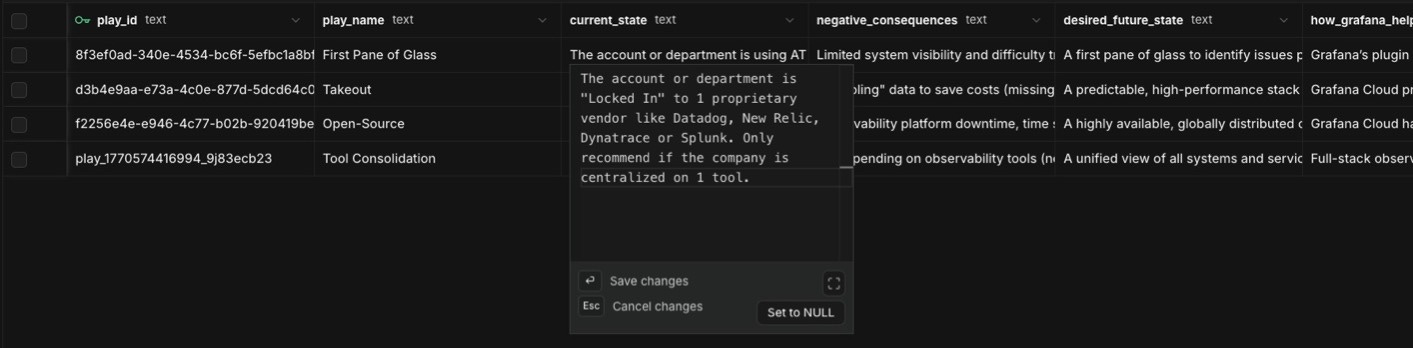
For each scenario I’m storing:
The current state (what evidence suggests they’re in this situation).
The negative consequences of the current state.
The desired future state (the solution).
How we uniquely help them get there.
I also define the signal relationship logic: whether a given signal is evidence they’re trying to solve the problem, would care about solving it, or that the situation is present.
If a signal isn’t one of those three things, it shouldn’t be used for that specific sales play.
Note: In this example I’m using “Scenarios” and “Sales Plays” interchangeably, but in practice, you can have a one-to-many mapping of scenarios to defined sales plays to maximize rep flexibility.
Part 3: Account Analysis Agent (“Scenario” Classifier)
This agent classifies each account/contact into one or more scenarios.
I have a Supabase edge function that 1) looks at all account, contact and signal data, 2) cross-references it against the defined sales plays and 3) uses an LLM to output the relevant scenario(s).
The key design choice: this runs whenever the underlying account, contact or signal data changes, so the recommended play(s) is always up to date. At scale, debounce or batch these updates; re-running the classifier on every field write gets expensive fast.
This agent should output two things:
List of relevant sales plays in order of relevance.
The most recent, relevant signal/trigger that a message would lead with.
Optional: A confidence score per play.
Confidence is what keeps the system effective. Below a threshold, fall back to a default scenario (your company’s default problem-solution positioning) rather than forcing a weak fit.
Part 4: Situation-Specific Message Generation Prompts
Each play has a stored prompt (or collection of prompts) that guides email generation, with a specific narrative structure:
Start with the signal: Mention the event or observation naturally and concisely.
Connect the signal to the buying situation: Explain why that signal can accompany a particular operational challenge, initiative, or transition. Weave in supporting account context.
Introduce the solution: Share the specific solution to the hypothesized pain (technical solution, customer stories, outcomes, etc.)
Ask a low-friction question: Invite the buyer to confirm or reject the hypothesis.
This prompt is what translates:
Signal + supporting context + selected buying situation + likely pain + relevant outcome
Into this:
I noticed X.
Given Y, teams in your position sometimes encounter Z.
We help them achieve A without B.
Is that something your team is evaluating?
In my app these prompts are visible and editable in the rep UI, stored in a dedicated Supabase table.
Part 5: Retrieval and Drafting Agent
In order for an email to be generated using that prompt, the system needs to gather all relevant data and feed it to the LLM.
An edge function assembles a payload that includes:
The most relevant and/or selected “Situation” and "Sales Play”.
All of the relevant account and contact-specific data.
The highest priority signal/trigger.
Any relevant engagement history.
On click or automation, the agent feeds this into the play’s email generation prompt and executes.
Trigger → assembler (retrieval + synthesis) → LLM prompt → output email
Example for Grafana Labs
Signal: A new Engineering Director, Sarah Chen, user joins CloudFlow Systems (fictional company). Assume we have no historical engagement with Sarah.
Here’s a 100% AI-generated email the system put together:
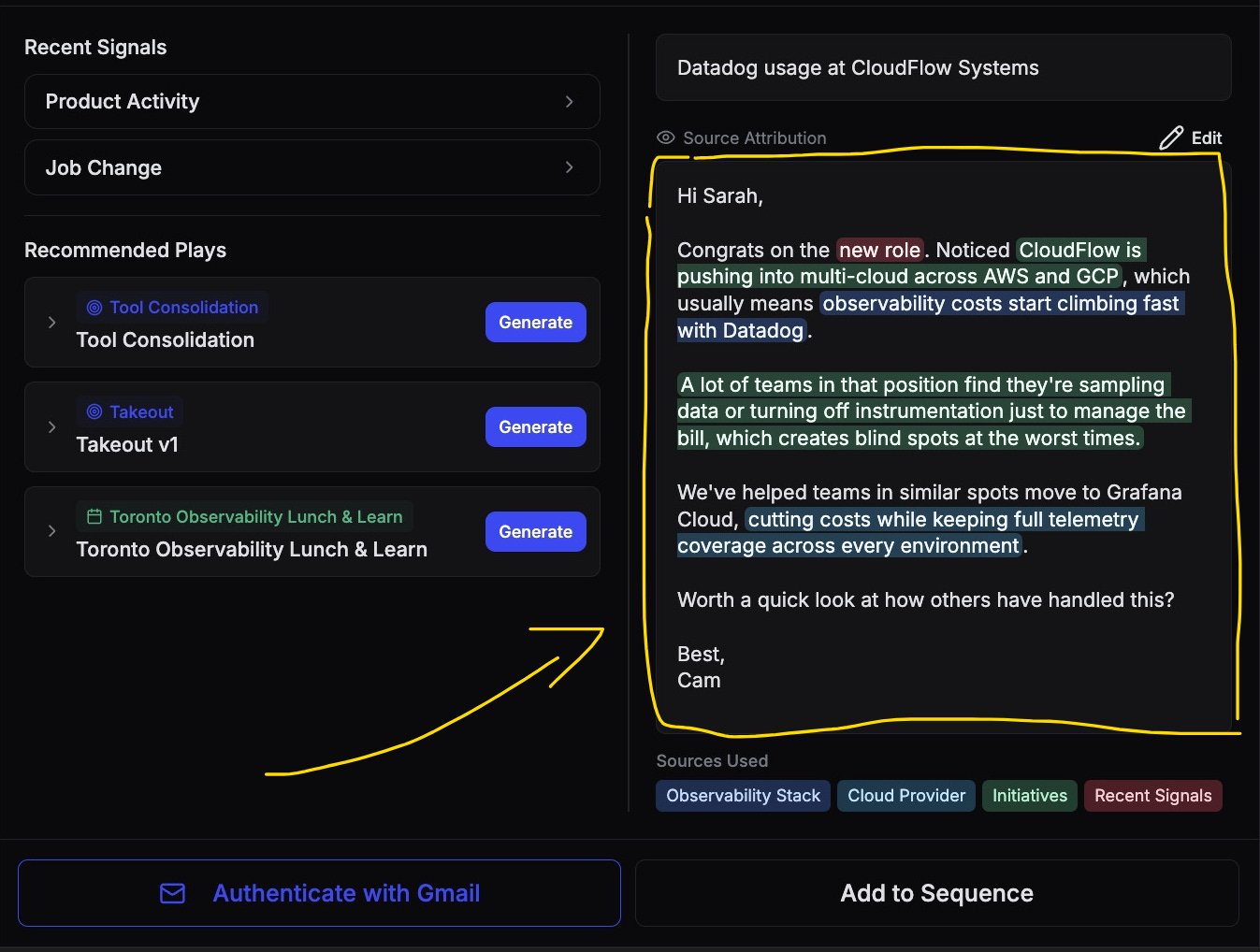
The signal itself is weak. What makes the email work is the second half: instead of ‘congrats on the new role’ plus a generic pitch, it pairs the congrats with a specific read on their business: what’s likely happening, why it matters, and how we help.
Closing: You Don’t Need More Signals
The outbound market has become very good at detecting events.
Anyone can see if a company is hiring, raising money, showing intent, adding technology, or had a new executive join.
But detecting an event is not the same as understanding its commercial meaning.
The organizations that win today’s (and the next) generation of outbound will be the best at translating their signals into:
Unique buying situations.
Relevant hypotheses.
Timely next actions.
Credible, buyer-focused messages.
That's the difference between an email buyers delete and one they answer.
-Cam Wright
P.S. if you enjoyed this article, feel free to leave a “like”, “comment” or “subscribe”. I read every comment and will make sure I get back to you.
Hey cam do you have examples of emails that did get replies?